The Integrated Project Management System (IPMS) manages projects from conception to completion. This guide provides a step-by-step framework to ensure efficient planning, execution, monitoring, and closure of projects.
Creating a new Business Opportunity
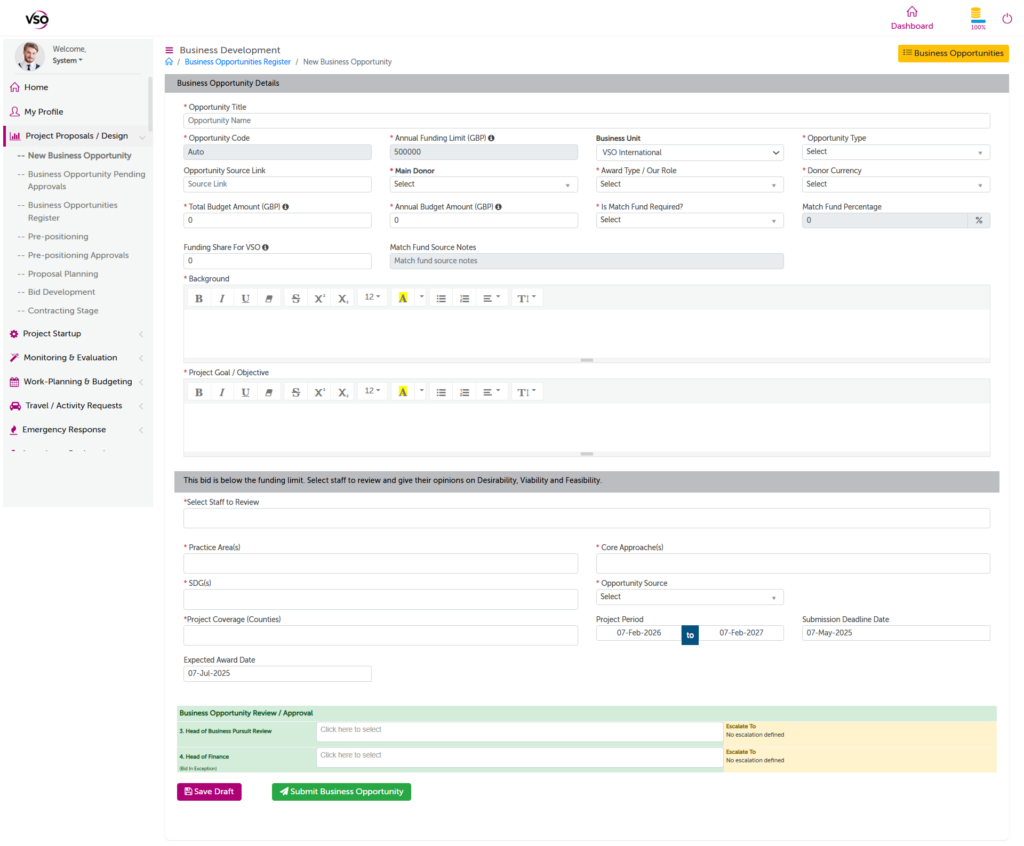
- Go to Project Proposal / Design link on the main menu
- Click New Business Opportunity
- Enter opportunity details. Labels with an information icon (i) contain hover notes that are shown on clicking or hovering a mouse pointer.
- Click save daft button to be able to come back and edit.
- Once all details are entered select approvers for each step and click Submit Business Opportunity button to launch it through the approval process.
- Note that the steps in the approval process automatically vary depending on the parameters entered.